WP Extended Pro of choice extending the WordPress core features with all of the essential tools needed to manage a professional WordPress website.
WP Extended Pro Plugin Features
Admin Columns
Organise columns for posts, pages, media, comments and users.
Admin Customiser
Update the Admin colours and icons to suit your preferences.
Quick Search
The easy way to navigate around your WordPress website.
Disk Usage Widget
Adds a widget to your WordPress dashboard display disk usage statistics.
Indexing Notice
An admin bar notice displaying an indexing status notice.
Duplicate Menu
Seamlessly clone your WordPress Menus in just a couple of clicks.
Code Snippets
Insert HTML, CSS or JS code snippets to the website header or footer.
Pixel Tag Manager
Easily manage the pixel tags for Google Analytics, Facebook and Pinterest.
Rollback Manager
Revert to previous versions of any theme or plugin from WordPress.org
SMTP Email
Reliably ensure the successful delivery of your emails with SMTP.
Hide Admin Notices
Hide unnecessary admin notices, allowing for a more focused and efficient admin experience.
Debug Mode
Enable Debug Mode to easily troubleshoot and resolve issues, providing detailed error logs and warnings for developers.
Limit Login Attempts
Prevent brute-force attacks by limiting the number of login attempts.
Block Usernames
Prevent use of certain usernames, reducing the risk of targeted attacks
Custom Login URL
Customize your login URL to increase security by making it harder for unauthorised access.
Hide WP version
Enhance security by hiding the WordPress version number from your site’s source view, thwarting targeted attacks.
Maintenance Mode
Switch your site to Maintenance Mode for updates or changes.
Disable XML-RPC
Increase security by disabling XML-RPC to prevent external applications from interfacing with your WordPress site, reducing vulnerability to attacks.
User Enumeration
Secures against hackers scanning for usernames, blocking user enumeration attempts.
User Last Login
Display the last login timestamps of users, monitoring user activity and managing user accounts effectively.
Disable Auto Updates
Gain full control over your site by manually managing updates, ensuring compatibility before applying new changes.
Clean Dashboard
Streamlines admin dashboard by hiding unwanted elements for a cleaner interface.
Disable Blog
Transform your site into a non-blogging platform by disabling blog-related features.
Disable Comments
Eliminate comment sections from your site, reducing spam and moderating efforts.
Hide Admin Bar
Keep the admin bar hidden for specific user roles or on specific pages.
Disable RSS Feeds
Ideal for websites that don’t require syndication or want to keep content exclusive to their platform.
Menu Editor
Customise your admin menus, including reordering, hiding, or renaming menu items.
Classic Editor
Switch back to the classic WordPress editor if preferred, offering a simpler content interface.
Gutenberg Widgets
Disable the Gutenberg widgets for those who prefer the classic WordPress interface.
Woocommerce checkout field editor and manager plugin helps to manage the checkout page fields in your WooCommerce Store. Its drag and drop form builder helps
WooCommerce Checkout Field Editor and Manager Pro Features
One-click field add option.
Edit/Disable/Hide Default Fields.
Add/Edit/Delete new Fields.
Change Fields Order.
Enable or Disable Checkout Fields.
Field display in order Email and Order details page.
Adjust the column width.
Set Custom CSS class.
WPML and Polylang support.
Create new sections other than default sections.
Add New Sections to Almost 13 Places on the checkout page.
Conditional Logic for fields & sections.
Conditional rules based on existing fields, product, product variations, category, user role, shipping method and payment method.
Show or Hide the fields/section based on a condition or a group of conditions.
Change the Order of Display of Fields and Sections.
Enable or Disable/Hide Checkout Fields and Sections.
Duplicate Checkout Fields and Sections.
Custom validation rules using RegEx for text and textarea input.
Add extra fee based on field selection.
Option to add tax for extra fee added.
Extra fields email Fields display position management.
Disable section title/heading display in order Email.
Disable section title/heading display in order detail page.
Paymattic Pro (formerly known as WPPayForm) is the perfect lightweight WordPress payments and donation plugin fit for your small business, online fundraiser,
Paymattic Pro WordPress Plugin Features
Subscription Payments
Keep the bills coming for your continuous services by embedding a single payment form.
Currency Settings
Collect payments from anywhere in the world with the 135+ currency supported by Paymattic.
Coupons
Set minimum purchase amount, discount type, & discount percentage with the coupon code feature.
Custom Input Fields
Enjoy 35+ fully customizable input fields to create the perfect WordPress payment and donation forms.
Prebuilt Form Templates
Quickly create useful WordPress payment and donation forms with the 70 prebuilt form templates.
User Registration
Create users, assign roles, generate lists, and collect other valuable meta data, all with a single plugin.
Form Layout
Design smart looking forms and attract visitors by configuring dynamic form layout settings.
Unlimited Customization
Add custom input fields, configure integrations, or design form layout. Go for custom CSS, and JS to go beyond.
Import-Export
Easily import or export WordPress payment and donation forms as JSON files with just two clicks.
Scheduling & Restrictions
Experience intuitive form building by scheduling the payment form, limiting payments and maximum form entries.WP User Registration
Integrate WP User Registration and allow users to add posts, comment, or work as administrators.
ActiveCampaign
Integrate ActiveCampaign to drive growth in your business with customer experience automation.
Mailchimp
Integrate MailChimp to engage more with customers by sending emails and prebuilt automations.
Zapier
Integrate Zapier to automate your work using 5000+ apps and tools to push your business forward.
WebHook
Integrate WebHook to generate a unique URL to test, inspect, and automate incoming HTTP requests.
Twilio
Integrate Twilio for personalized interactions through SMS and connect instantly with customers.
Slack
Integrate Slack to reinvent networking and get everyone you need to work in a place.
Telegram
Integrate Telegram to experience a secure and fast cloud-based mobile and desktop messaging.
Google-Sheets
Integrate Google Sheets to analyze data and make data-driven decisions.
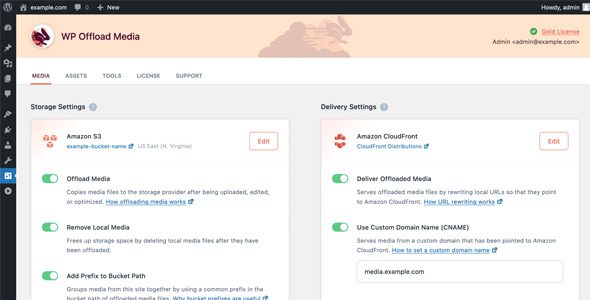
WP Offload Media copies files from your WordPress Media Library to Amazon S3, DigitalOcean Spaces, or Google Cloud Storage and rewrites URLs to serve the
WP Offload Media WordPress Plugin Features
Control Cloud Storage From The Media Library
Painlessly Upload Your Existing Media Library
Move Files To New Storage Path
Copy Between Buckets
Private Media Served Lightning Fast From Amazon Cloudfront
Download And Remove From Cloud Storage
Remove Files From Server
Speed Up The Delivery Of Css, Js, Fonts, And Other Assets